Showing posts with label Review. Show all posts

Two Lubuntu and Xubuntu blog to explore

2
Today I am going to tell you something about two blogspot blogs. Day by day LXDE and XFCE based distributions are coming infront of main stream Linux world. Many of us starting to love these lightweight operating systems. But there are not much blog which published tips and tricks about these desktop environments. Recently I found two blogspot blogs which are not official but publishing many valuable, informative, importent tips and tricks about LXDE and XFCE.
http://lubuntutips.blogspot.com Lubuntu blog
Lubuntu Tips
First of all I am telling about LXDE based Lubuntu blog. It's called "Lubuntu Tips". Url is http://lubuntutips.blogspot.com.

I don't know the man behind this blog. But I honor her/his effort to teach us about Lubuntu and LXDE. I learned many tips from this blog. I will publish some of them in my blog from "Lubuntutips" blog. Tips, tricks, hacks, customisation, decoration, various information and news about Lubuntu and lxde are available there. I really love this blogsite and visit it regularly. I am really learning miscelanious information from there.

My another favourite blog is http://xubuntugeek.blogspot.com/
http://xubuntugeek.blogspot.com Xubuntu blog
Xubuntu Geek
XFCE is another famous lightweight Desktop Environment in the Linux world. In the 'Xubuntugeek' blogsite, the briliant blog owner publish various informative, critical tips, information, news, tweek regularly. Once upon a time there is a 'Xubuntu' blog on wordpress. But now a days update posts did not come for many months. But this 'Blogspot' based blogsite is active now. I got many many idea, informations from this blog.

If you are a user of Lubuntu or Xubuntu, then these sites must help you much better then any other blog. I wish these blogs will continue their journey for many years and help people to solve various problem. I will publish some tips, tweek, hacks and informations from these blogsite with acknoledgement in the next days.

LubuntuTips address: http://lubuntutips.blogspot.com/
XubuntuGeek address: http://xubuntugeek.blogspot.com/

Read More »

Peppermint One 01042011 Respin Review [ScreenShots]

0
New spin of 'Peppermint one' operating system has been released some days ago. [Newslink]. I missed the news. It published on 04 January 2011. last weak I start to download new Peppermint one. Today it completed. I run 'Peppermint-One-01042011.iso' with the help of Virtual Box. Test different.
At the news post on Peppermint os homesite they said that only some change has been implied in this new respin. I am just pasting some text from the announcement post.
  1. The default kernel has been updated to 2.6.35 in order to stay more current regarding hardware support and to match the kernel in Peppermint Ice.
  2. The Hardware Abstraction Layer (HAL) has been completely removed from this edition in order to help with performance and to increase application modularity.
  3. The default screenshot application has been replaced with PyShot, a simple Python/GTK application contributed by our longtime friend and supporter, Ikey Doherty.
  4. Some low level utilities have been updated such as the GNU Coreutils to version 8.8, the Samba file sharing framework to 3.5.6, and others.
  5. Some user level applications have also received updates such as the PCManFM file manager to 0.9.8, LXTerminal to 0.1.9, and Firefox to 4.0b8
But I think they forget to mention a great change found on this new release. They said it only in half sentence at last number. This is about PCManFM file manager. Now PCManFM desktop icons are movable. So you can rearrange desktop icons just dragging it anywhere. Position of icons can be saved and restored. Day by day LXDE are becoming more popular for its various kind of feature. This is the newest one. I believe users like me feel more exciting with this new ability of pcmanfm.

After downloading and setting up in VirtualBox I found the screenshots published below one by one.
Read More »

Twitter blog using blogger blog

0
Twitter blog using blogger blogI have just visit blog.twitter.com and found that it is using blogger.com hosting blog. I am gettng surprise to see that they have not put any link to blogger.com. I guess if they use wordpress blog then they must use a phrase 'Proudly powered by wordpress'.

My question is why twitter authority have not mention any acknowledgement to blogger. They should write a single line like me. I wrote a single line at the bottom of my blog "Powered by Blogger." This is a common courtesy to using any free service online, but twitter failed to show it.
Read More »

antix vs swiftlinux comparison

1
Swift Linux Official LogoSwift Linux is an another floavour of antiX os. I found it on antiX forum. I feel so much curious that I started to download it. After several days I am able to complete it. Just after download I start "Virtual Box OSE" and run "swiftlinux".

I am so frustrated that can't talk for some minutes. Swiftlinux is antiX. Yes, There is nothing difference between antiX and Swiftlinux. Both are same on my view. I am not a geek. So can't tell any tech base difference. But after start everybody who know 'antiX' will be worry about 'Swiftlinux'. I don't want to write any review for 'Swiftlinux', Because, actually it is antix, wrap with and decorate with other theme. I believe it has no future.

I run both of them on 'Virtual Machine' and took those screenshot. Look at the image below. Left side is default 'antiX' os and right side is 'Swiftlinux'. I think you are viewing huge difference between both of them.
antix-swift-linux-applications-accessories meu-submenuI expand 'Accessories' sub menu from 'Application' main menu. If you can't see clearly click on the images. You click will open larger image.

You should not mention changed theme as a difference. "AntiX' use 'IceGilDust' and 'Swiftlinux' using 'IceClearlooks' themes.
antix-swift-linux-applications-system-tools-submenuAre you telling about those desktop icons showing on swiftlinux? Friend, icons are showing on swiftlinux, because rox filer is selected here as default window manager. It automatically run first at startup. AntiX also has this included on main menu. You can use 'rox' filer as default wm.

My suggestion is not to download 'Swiftlinux'. If you have antiX downloaded then it will give you the original test of 'swiftlinux'. 'What makes Swift Linux so great?'-- I don't found any unique reason which is only perfect for 'swiftlinux'. You may read that page and understand yourself.
Read More »

antiX OS configuration and using

2
After using antiX os for several days I am focusing on some problems which need a little attention of developers. I think if they add or fix this things on next version told here, these customising will increase antiX operating systems user number more.

I have tried to do some customisation. but failed. I am not a software hungry techie geek. I just need to do some essential job. I am telling them one by one.
  • 1. Connecting internet: I am a user of GPRS. I use it with Nokia e51 mobile phone. This gadget works fine as a broadband mobile device on Ubuntu, Peppermint os and Puppy linux. I have not click much to connecting internet. I don't going to tell about other os, I want to know solutions which occurs on 'antiX-M8.5'
    • a) Thank developers for both 'usb-modeswitch' and 'wvdial' installed. I edit wvdial.conf with leafpad. But 'gppp' have cannot connect. I wrote 'wvdial' on regular terminal but it said that ….. (Stay with me, I will tell it details on next post). I have to run 'wvdial' on 'root terminal' to connect every time I tried to connect. Is it normal to run 'root terminal' every time when I wish to connect internet?
    • b) After connecting internet I found that there is no any monitoring tool or application. So I think developers should add a 'network traffic monitoring tool' and or a 'network status monitor'. Puppy linux has this kind of applet on right bottom panel named 'blinky'.
  • 2. Foreign Language: I wrote my own language using either SCIM or ibus input method system. None of them are installed on antix-m8.5. This is not fair. Developers should add SCIM or ibus on next versions. I see 'ibus' installed on 'synaptic package manager'. But don't work on any text editor. I did not found 'ibus' on 'Input Methods' on any text editor. I tried to start ibus or SCIM right clicking on text editors body.
Read More »

antiX linux operating system snapshot gallery

0
I download antiX m8.5 and testing. 'antiX OS' Installed Succesfully on my machine. After using it for some days, I think, now I can publish a post titled antiX Linux review from my view. Here I am publishing menu entries on antiX operating system. I think this "antiX snapshot gallery" will help new linux user to explore a different one.

antiX Linux OS Boot Menu
antiX os boot menu
antiX Boot Menu. Themed Personality Marek Edelman. Select options for load live or extra functions. This is accessories menu.  A lot of essential applications added in this list.
Read More »

antiX Linux review from my view

0
antiX linux operating system default desktop wallpaperantiX linux operating system default desktop wallpaper

Recently, I have download another light-weight Debian based Linux antiX. I install it on a separate harddisk. It installed successfully and have not delete other operating systems on grub menu. I use it for several hours. First of all I like the philosophy of naming itself. AntiX developed by 'anticatpitalist'. Great combination. I have not found any kind of history related to antiX operating system. I thought developer might be a diehard leftist. He is a protester of allkind of capitalism. I support you from the philosophical view.

I am trying antiX-M8.5-486 version. Code name is: Marek Edelman. I am not sure whether it is a codename or not. I saw this revolutionist on boot screen. I searched Google and found huge information about 'Marek Edelman'. Naming Linux using leftist name is a really unique idea. I also thought that Linux should be a power of poor people. 'Linux' itself and 'open source' are a revolution against all kind of capitalism act of software giants. Linux will always fight against all kind of fundamentalism, capitalism and terrorism. I think s/he tries to focus on this. I welcome you and I like and support this idea. I wish to see famous revolutionist face on next versions.

What I got?
1. Antix-m8.5 use icewm for doing activity with window related activities. It don't have any desktop icon but we can use 'Rox' window manager with desktop icon. I don't like to see many icons on desktop. I like iconless desktop on 'icewm'.

2. Antix-m8.5 use 'pcmanfm' as file manager. This works fine with me. I am satisfied to this tiny file manager. I use it on LXDE, I am joyful to know that pcmanfm also works on 'icewm'.

3. In Office menu antix-m8.5 include 'Calculator', 'AbiWord', 'ePDFviewer', 'Gnumeric', 'iceape Address Book', 'Osmo', 'Phonebook'. All are light-weight and full functional faster application. I think a general user does not need more in a office suit.

4. You would get many kind of essential application on Network menu. AntiX Default browser is 'Iceape' . It is a mozila related work and fork of Seaminkey. This full-featured web-browser worked fine for me. But I like to use Firefox and Google chrome (ium). You can chat, compose or check mail, browse through FTP etc. job with antix-m8.5.

5. There are many items on Multimedia section. You can play audio, video, can rip any audio CD or burn CD or DVD. You can record sound with external microphone and edit. You can use webcam using 'Cheese', Gxine also included for better video viewing experience. Antix also added famous 'Goggles Music Manager' (I wrote a post on it, named: …...). DVD slideshow making is very easy with 'imagination' a simple and lightweight DVD slideshow maker. It has famous audio player XMMS (x multimedia system). This is a look alike of famous windows based audio player 'WinAmp'. When I was on 'windows', I never ever use another music player instead of winamp. After transforming in linuxuser I found XMMS, but as a Ubuntu user I always missed it (I don't know what's the problem within ubuntu and xmms.). Antix-m8.5 also include 'Mplayer'. It is a famous and powerful video player on Linux.

6. Game: It has only 3 (Three) Games installed. It also has a 'DOSBox Emulator', So you can run DOS games using this. It also have my alltime favourite 'Lbreakout', also has 'sudoku-savant', and 'xmahjongg'.

7. Default background is really great. I like to get some information about this image, but can't. Nothing wrote anywhere.

At last I must say that I like the idea. This is really a very light operating system. Puppy also a light runner, but antiX has pcmanfm for exploring files and folder. Rox is also powerful and better. But it only support only 'one click' option. I am not familiar with it. (I will tell you later, why I like pcmanfm file management)

I think if Mepis or own community keep support to it, antiX will go many miles on future.

Visit antiX Linux operating system website.

I am going to publish a snapshots gallery post on antiX operating system next. Follow next post for some snapshot of antiX linux operating system.
Read More »

'antiX OS' Installed Succesfully

0
antiX operating system desktopantiX M8.5 operating system desktop
I download an another flavour of Debian based Linux. It called 'antiX'. It use icewm as a window manager. So, it takes a very small space to install itself. It can be run in any lightweight hardware. (Window Manager 'WM' is not a desktop environment, so has no many feature. But, it also do necessary jobs.)

Not like others, antiX include various file manager by default. You can use 'Rox' (Used in Puppylinux) or 'pcmanfm' (Used in LXDE) both in this nice distro. So, it will run on older computer. Recommended RAM is 128MB but you can use 64MB to install it. It can operate older PII 266 systems. It takes 1.2GB hard disk space.

There are plenty of applications I found on Main Menu. I don't want to discuss them here. I will publish another posts on 'antiX screen-shot' .
antiX main menu screenshotantiX Main Menu
Thank you 'antiX' for not deleting my systems 'grub' options. Other installations are showing on grub menu.

In this moment I am using antiX to publish this post and browsing internet. That means, I have successfully configured antiX to connecting internet via my Nokia E51 mobile phone. Have a simple problem. 'wvdial' command require root terminal to connect. General user terminal start dial, found misc signal ok but at last it failed to connect. It said:
Could not modify /etc/ppp/chap-secrets: Permission denied
I will post details later. Without this problem I feel happy with 'antiX' linux.
Read More »

Things after Ubuntu 10.10 install

0
I am just installed Ubuntu 10.10 (Maverick Meerkat) on my machine. Installation process takes only 8 minutes to complete. You may check "Ubuntu 10.10 installation guide and gallery" to fly through the process. I am really impressed. It is really fast, I mean fastest operating system. Looks very smart. Icons has changed on many place. But after install I did not found some necessary application.
  • A handy internet traffic monitor Netspeed is not available on 'Synaptic package manager' or 'Ubuntu Software Center'.
  • My Nokia E50 Mobile device is not detect so fast as 10.04 or older. It takes a long time to detect it. Even after a long wait, when it found my mobile phone it did not start 'Mobile broadband connection wizard' automatically. I need to click network icon several times and I succeed.
I run 'sudo apt-get update' in terminal. My system is updating on background. ubuntu system updatingAfter completing update I will install 'conky' at first.Then I will install Ubuntu restricted extras. It will install some commonly used applications with restricted copyright. So after install this package will enable ability to play mp3, avi, mpeg, trutype, Java, Flash etc.

I will install Unrar to open rar files in Ubuntu Linux.
I like to install Lugaru and World of Goo, the best physics based puzzle game I ever played. I will install 'Leafpad'. It is my favourite application to write some text. As I know that OpenOffice.org is going to die within short time, then I must use 'Libre Office'. So I will install Libre office on my Ubuntu machine. Oh yes, I will install safely remove USB device applet. and Oh yes... there are various kind of beautiful wallpaper available now on desktop background. In this Ubuntu version they added two auto scroll wallpaper set. This can change wallpaper automaticaly.

I will tell you later about Ubuntu 10.10 more. Until then today I want to stop. Thanks for being with me.
Read More »

ADesk Bar: Alternative Panel for Ubuntu

2
Today we will replace our bottom panel with a attractive one. Look at the image below.
a desk bar alternate bottom panel ubuntuIt's called 'ADesk Bar', current version 0.4.2 and it is a lightweight application launcher for Openbox

But you can use it as a alternate to default bottom panel on Ubuntu Linux (Gnome Desktop). This include some more feature then original Ubuntu bottom panel.A Desk bar preferences alternate to default panelADesk Bar preferences. Resize it, Colour it, Hide it automatically or always. You can use it as a replacement of that default bottom bar. Default options are: size, style, icon effect, behavior (fixed mode aka use as a alternative panel).
Read More »

Mac OSX Lion Published

0
Mac OSX Lion published several days ago. I never ever dream to buy a one. Yes, I have no much ability to buy a low cost Netbook. So, how dare I even thaught about Apple computer. Yes, friend, I have no much courage to think about a mac computer. But I thought, I have right to see their image online. So I visit Apple website and brought some picture of world's most advanced operating system.
Mac OSX Lion apple website snapshot
I am just reading their first sentences on official MacOSX Lion webpage:
Read More »

Ubuntu10.10 Netbook review & gallery

1
Ubuntu 10.10 netbok desktopI have downloaded Ubuntu10.10 Netbook version. This ISO file is slightly larger than desktop releases ISO size. You know I had tried to run it in VirtualBos OSE. But failed. I thought Ubuntu 10.10 Netbook is not start in desktop hardware, but it is not true. No required driver detected for unity problem caused for lower graphics card. I told you that I burn the ISO file on a compact disk and insert it in cd drive and seitch on my computer. It takes at leas 18 minutes to start desktop. It is a very long time to start an operating system. But I know that my CDDrive is an ancient one. Though it has 32x write capability but it won't work. I waited till it show desktop. I went on kitchen and do wash for 15 minutes. I came back to computer several time to check if it starts or not. At last I came to Ubuntu 10.10 netbook desktop.

At a glance everybody will look at the leftbar. It's called "Unity apps menu". This left bar comes with some common application. To run an app, click on the app icon (launcher).
Unity apps menuUnity Apps Menu
If you hover, you see a caret indication looks like a tool tip. You can not add a new link here but remove an item with dragging it by left click and from the right click sub-menu. You can rearrange the launcher icons by dragging them to up or down with left mouse click.bar fills up and foldup accordianThis bar works like active window viewer. If this bar fills up, the apps icons at the top and bottom goes fold up accordion style. Hover mouse pointer over an icon to return to normal size. By dragging or scroll that icons up and down we can see those that are lower down or higher up on that bar.
Search box on ubuntu launcher pageYou may noticed that a search box included at Ubuntu launcher page. You can find a file or application entering the name here. Sometimes search result show apps from the Ubuntu Software Center that you may not have installed yet.

When I try a new linux distro I always do my first job. I attached my Nokia e51 mobile phone in a usb connection and try to connect internet. Ubuntu do this thing for me in a easy method. I start this Ubuntu 10.10 netbook review and gallery with this issue.
New Mobile Broadband ConnectionNew Mobile Broad Band Connection
Just left click on the Network Manager Applet icon on right side of top pannel. A menu will scroll down as the picture above. Click 'New Mobile BroadBand Connection'.
Setup Mobile Broadband ConnectionSetup Mobile Broadband Connection
An window will appear with some suggestion. Click on Next button and follow the instructions. Connecting internet is not much easy as Ubuntu do.

Ubuntu 10.10 Software CenterUbuntu 10.10 Software Center
Ubuntu 10.10 Software Center is more informative and usable then older one.
Office Suite on Software CenterOpen Office Suite at Software Center
Ubuntu Button MenuUbuntu Icon Menu
When click on the Ubuntu icon on left corner of top menu then some smart quicklinks come infront of you. I named it Ubuntu Icon or button Menu.
Firefox 3.6.10Firefox 3.6.10
Latest version of Mozilla Firefox Included by default.
ApplicationsApplications
Applications are listed thoroughly in this version. I like the idea.
Some images taken from Ubuntu 10.10 Gives Netbooks an Innovative New Look post.
Read More »

New Peppermint Ice os startup messages

0
I have just downloaded Peppermint-Ice-10012010.iso. It is new version of Peppermint Ice OS. You know I like Peppermint OS very much. Because it is an official distribution of Debian based Linux which use LXDE as desktop environment. My love is based on these two things. Using Debain based Linux is easy. Installing software is very easy and fast. LXDE can run on older computer, so I like to support Peppermint OS. I was not available in internet for some days. When I was offline Peppermint official published their new release. When I know it, don't be any late to download my favorite fork ICE. I try it with VirtualBox OSE. I am quite frustrated viewing the startup messages.
Peppermint ise startup booting inforThe first thing I noticed that I am running Peppermint ICE, but it is showing 'Peppermint One'. What a funny!!
peppermint os startup error messageOn the running process it shows this message.
.[ 14.200889] piix4_smbus 0000:00:07.0: SMBus base address uninitialized - upgrade BIOS or use force_addr=0xaddr
I don't know the meaning of it.
peppermint ice os startup error messageThis message is quite horrible. Oh no! I don't want to see it again.
FATAL: Error inserting ramzswap (/lib/modules/2.6.35-22-generic/kernel/drivers/staging/ramzswap/ramzswap.ko): Unknown symbol in module, or unknown parameter (sec dmesg)
But at las, Peppermint run in normal stat and everything goes fine. I wish Peppermint official will think these simple thing before publish newer version.
Read More »

Menu Items in my Ubuntu 10.04

0
I am using Ubuntu 10.04 since May 2010. Before installing 10.04 I have published some post on the list of packaged installed on my computer. Tomorrow Ubuntu 10.10 (Maverick Meerkat) is going to publish. I must download this newer Ubuntu and install in my system. Today I am publishing packages list installed in my Ubuntu 10.04 machine.
Accessories menuAccessories Menu
Read More »

BitMeter: An open bandwidth monitor

0
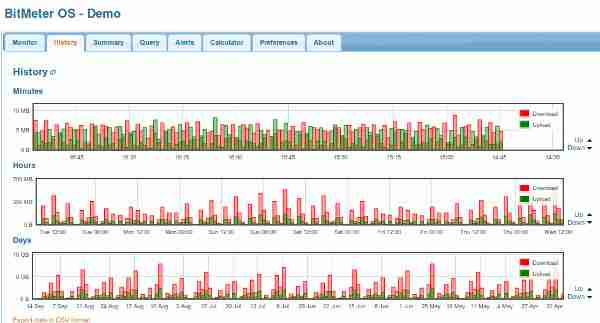
BitMeter OS is a great tool to monitor or keep track of internet/ network connection. It is free to use and open-source. This remote bandwidth monitor tool will monitor bandwidth. It works on any platform like Linux, Mac OSX or Windows. From now you will know how much you spend time online. You can view this information in a variety of ways.
BitMeter OS MonitorBitmeter OS Monitor
BitMeter OS SummaryBitMeter OS Summary
BitMeter OS HistoryBitMeter OS History
BitMetes OS is still in beta version. Before download you can try it in this webpage.

Features:
  • Get a quick summary.
  • Notify you when you cross your bandwith limit.
  • You can retrieve data from custom date range.
  • History of amount of data uploaded and downloaded.
  • The data can also be downloaded as a CSV file.
  • Remote monitoring.
  • Web based
  • Easy way to backup.
You can monitor the bandwidth usage of a computer on a network remotely. Allow the target computer to accept incoming connection at a specific port (port 2506).

Small home and office network might make a look on this demo site. Check test all your requirement within seconds and make decision.
This demo displays dummy data generated by the codebox server. When installed on your computer these graphs will show the upload and download speeds of your internet connection.
All the data is logged into a single database file which can be found on "bitmeter.db" file. Official Website to download and grab more information and various kind of tool.
Read More »

More review on Peppermint ice operating system

0
I am looking for more information about Peppermint OS. After publishing first release (One) team got a huge attention from online audience. Peppermintos forum getting more trafic day by day. Developer team then decided to publish an another distro which will be more lighter then one. Peppermint ice os comes onlight after two months of oneos. Peppermint one downloaded more then 250,000 times. But what about Peppermint ice. I am looking for some fair critic about this linux distribution.

Read More »

Peppermint One OS review

0
I am planning to buy a NETBOOK Computer. I must run Linux on it. But what Operating System? I am really confused. There are many operating system which are focused to Netbook. Some of them are famous on community. Some are trying to stay tuned. But I have a different choice. I am hoping an another thing from my preferred operating system. I will tell my special netbook operating system specifications later. You know that on this searching way I have found a Netbook focused websentric operating system. It is Peppermint OS. I am reading about this new os. I found some more review about peppermint Operating system on the net.

Read More »

Blogging software on Ubuntu Linux

4
Next moth I am going to hibernate. Those days I will not be available on internet. It may stay atleast 20-30 days. I want to write blogpost at my offtime. How do I do that? There is easy and common way to do that. Writing thoughts or analysis in a text file or open office and save it. One month late when I come back then do only copy and paste. Yes it is a easiest method to do such kind of job. But I am looking for a different tool. I am looking for a blogging software or a blogging client or a blogging tool in Ubuntu Linux. There are many same kind of offline/desktop blogging tool available for windows. But what about linux.

Read More »

Peppermint Ice OS review

0
Peppermint OS is a LXDE (Lightweight X11 Desktop Environment) based operating system. Which means it require less hardware, less memory then other linux distribution. After releasing its first version it attract lot of people. Day by day Peppermint OS is taking a honorable place in linux community. My good-luck that I know PeppermintOS from its first stage. Recently I have just read a review about Peppermint OS. I am sharing them with you now.

Lee Matheus wrote on Downloadsquad.com. Title: "Peppermint Ice is like Chrome OS without sacrificing local apps". He meet PeppermintOS developer Kendall Weaver. His OS takes only 6 seconds to boot in his core2 notebook. Lee said about people that they thought a lighter distro should not have many local apps by default. They compare it with Google chrome OS. Some techie person thought that less native apps theory should apply on any lighter linux distribution. But Peppermint OS stand other side of so called popular thought. So developer include some essential local apps with many webapps. Lee wrote on the post that:
Peppermint is a solid Linux distribution for people who just want to surf but don't want to give up the flexibility which Linux distros typically provide. The interface is clean and simple, and should be familiar to anyone who's ever used Windows XP. Hey, if my 5-year-old can jump in and find his YouTube favorites on Peppermint, the learning curve can't be too steep (if it even exists).
Read More »

Google Homepage Background

0
Google Homepage Background
This is very pleaser that Google has activated homepage background facility. This is very funny. Many of us is pleased to Google. But I think I can not use this colorful feature on my regular online time. Because activating background in Google homepage required login. But I don't login Google always time. By the way if you want to decorate Google homepage in your Google account just do the following.

  1. Login in Google account with your id and password.
  2. go to 'Google.com'
  3. on left side of bottom area of Google Home page
  4. You will find a line "Change Background Image" at the left side of bottom area.
  5. Click that textlink.
  6. You will redirect to a background image gallery.
  7. Google image gallery
  8. Choose a picture (click on the image. it will save itself automatically).
Read More »