

Showing posts with label Technology. Show all posts
Showing posts with label Technology. Show all posts
Downloading with 'wget' in Lubuntu
0
 A slim download application has been added in Lubuntu 12.04 by default. It's name is 'wget'. 'WGET' can download from anywhere in the world of web. The great information about this terminal based application is that it support resuming. Retrieving files from the web with this light/ minimalist application is really funny and helpful for low memory. But you can use "Uget", if you do not like terminal based application. I am downloading latest famous Ubuntu magazine 'Full circle magazine (issue 62)' with wget on the above screenshot. Here is some talks about 'wget' which I found at 'Synaptic package manager'.

Active Energy Saving Mode on Blogger blog
2
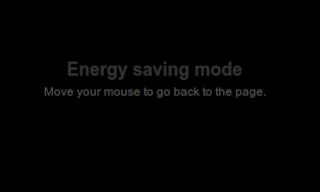 Every minute visitors browsing websites emit 1.2kg of CO2 into our atmosphere. We conscious people should not do this intentionally. So, conscious webmaster like to add a script on their blog which reduce some CO2 activating an energy saving mode on their blog. 'OnlineLeaf.com' site set a campaign for Green Website. They create a standby engine which make a website greener then other. After adding a code snippet on your blog you can will convert in a less CO2 emitting website. It is very easy to implement. You do not need to know and environmental science to make your site environment friendly. Read more at www.onlineleaf.com.
Today we will learn how to make our blogger/ blogspot hosted blog a environment friendly website. Our blog will reduce CO2 on environment and will neutralize our CO2 footprints. This will work actively for 24 hours and will count every second. Do not doubt it activeness. It is a famous web tool to make this world more greener with the help of online.
What they say on their site:
 Every minute visitors browsing websites emit 1.2kg of CO2 into our atmosphere. We conscious people should not do this intentionally. So, conscious webmaster like to add a script on their blog which reduce some CO2 activating an energy saving mode on their blog. 'OnlineLeaf.com' site set a campaign for Green Website. They create a standby engine which make a website greener then other. After adding a code snippet on your blog you can will convert in a less CO2 emitting website. It is very easy to implement. You do not need to know and environmental science to make your site environment friendly. Read more at www.onlineleaf.com.
Today we will learn how to make our blogger/ blogspot hosted blog a environment friendly website. Our blog will reduce CO2 on environment and will neutralize our CO2 footprints. This will work actively for 24 hours and will count every second. Do not doubt it activeness. It is a famous web tool to make this world more greener with the help of online.
What they say on their site:
The standby engine is a project developed to reduce power consumption, when generating and displaying a website, without changing user experience while using the website. This is done by covering the site in a stationary, black color, which hides visual effects making the visitor's computer use less energy generating and displaying these.Ok, lets start....
It might not seem like a lot of difference, but after all every little bit does count.
Have not download Ubuntu 11.04
0
I have not download Ubuntu 11.04, because I have not feel any attraction to this newer release. The main reason is Unity desktop.
From years I have download some netbook edition linux releases and test them on virtual machine and live mode. None of them give me any pleasure of using Gnome. Yes, I don't owe any Netbook computer. But I did not feel problem to understand Unity. I download and tried various netbook based linux distributions like 'Moblin', 'EasyPeasy', 'Meego', 'Ubuntu netbook remix', 'Jolycloud' etc. None of them satisfy me in any way. Though they all are like Unity2d but the main reason is the desktop usability. I like to keep my desktop clean. I always add less shortcut on my desktop. This is my common habit since windows 95. And the boring thing is on Unity desktop or populer netbook OS desktops are full of icon (application link shortcut) on desktop area. Sometimes it is hard for me to find any current downloaded pdf file which is saved on desktop. Even on some OS I can not access desktop by mouse. I can't touch any file which is saved recently on desktop. On Unity a very disturbing thing is left side pane. This is quite extra width then Gnome bottom (or top) panel. So it takes more space. I don't understand why Ubuntu developers don't understand this kind of simple thing. If they like to add regular using application links in-front of hand then they could use drawer like thing. It should have a hide button, so I can use more space when drawing a picture and I need larger area.
There are another main reason not to download or taste Ubuntu 11.04. I read many forum/ blog post/ mailing lists mail that Unity is quite modern hardware hungry. I have not much ability to buy a newer hardware.
I know Ubuntu developers will not understand money weakness of me or me like users. Because their target is not to make a lighter linux. There are many other option for lighter hardware user. They should use Light Linux not Ubuntu main distribution/ addition. They can use Lubuntu or Peppermint or AntiX or any LXDE based operating system.
From years I have download some netbook edition linux releases and test them on virtual machine and live mode. None of them give me any pleasure of using Gnome. Yes, I don't owe any Netbook computer. But I did not feel problem to understand Unity. I download and tried various netbook based linux distributions like 'Moblin', 'EasyPeasy', 'Meego', 'Ubuntu netbook remix', 'Jolycloud' etc. None of them satisfy me in any way. Though they all are like Unity2d but the main reason is the desktop usability. I like to keep my desktop clean. I always add less shortcut on my desktop. This is my common habit since windows 95. And the boring thing is on Unity desktop or populer netbook OS desktops are full of icon (application link shortcut) on desktop area. Sometimes it is hard for me to find any current downloaded pdf file which is saved on desktop. Even on some OS I can not access desktop by mouse. I can't touch any file which is saved recently on desktop. On Unity a very disturbing thing is left side pane. This is quite extra width then Gnome bottom (or top) panel. So it takes more space. I don't understand why Ubuntu developers don't understand this kind of simple thing. If they like to add regular using application links in-front of hand then they could use drawer like thing. It should have a hide button, so I can use more space when drawing a picture and I need larger area.
There are another main reason not to download or taste Ubuntu 11.04. I read many forum/ blog post/ mailing lists mail that Unity is quite modern hardware hungry. I have not much ability to buy a newer hardware.
I know Ubuntu developers will not understand money weakness of me or me like users. Because their target is not to make a lighter linux. There are many other option for lighter hardware user. They should use Light Linux not Ubuntu main distribution/ addition. They can use Lubuntu or Peppermint or AntiX or any LXDE based operating system.
Install LXDE into Ubuntu
0
I have install LXDE on Ubuntu 10.10. LXDE stands for 'Lightweight X Desktop Environment. This desktop environment is faster then Gnome and KDE desktop. It can run on older machines or on low end/ older hardware based computer. It has many difference then other desktop. Very speedy. Although development is on going process, many operating system publish their releases using LXDE. I use Lubuntu and Peppermint os many times and fall in love. Day by day this little desktop environment grub attention of many distro.
If you tended to test LXDE then know some little information first.
 LXDE Desktop.
If you really like to try LXDE. Then use Synaptic Package Manager or Ubuntu Software Center. Run any of them and search with keyword "LXDE". Select all dependencies to download. Your new lightweight desktop environment depends on these dependencies to work properly.
 lxde available on ubuntu synaptic package manager. You can install it from here.
 You can install Lxde using ubuntu software center. I use synaptic to install. After completing install, I feel some curious to check ubuntu software center. I discovered that I did not install 'Task Manager'. So I install this application from USC.
 I install LXDE task manager later from ubuntu. This is very easy now.
After completing download and install logout your computer and sellect LXDE session from the popup menu on bottom bar.
When I get a first jump on LXDE, I really surprise to see a huge number of software installed. Then I realise that Gnome desktop applications are available on this session too.
For full information visit Lxde website for updates.
If you tended to test LXDE then know some little information first.
- At least 47 new packages need to download.
- It will take only 14.7 MB to download.
- When you install, it will take 43.7 MB of extra space.
 LXDE Desktop.
If you really like to try LXDE. Then use Synaptic Package Manager or Ubuntu Software Center. Run any of them and search with keyword "LXDE". Select all dependencies to download. Your new lightweight desktop environment depends on these dependencies to work properly.
 lxde available on ubuntu synaptic package manager. You can install it from here.
 You can install Lxde using ubuntu software center. I use synaptic to install. After completing install, I feel some curious to check ubuntu software center. I discovered that I did not install 'Task Manager'. So I install this application from USC.
 I install LXDE task manager later from ubuntu. This is very easy now.
After completing download and install logout your computer and sellect LXDE session from the popup menu on bottom bar.
When I get a first jump on LXDE, I really surprise to see a huge number of software installed. Then I realise that Gnome desktop applications are available on this session too.
For full information visit Lxde website for updates.
User switcher applet crashed, deleted in Ubuntu
0
 I don't know why it happened to me. I am still in Ubuntu 10.04. Last time when I start my machine, after desktop appear this message showing its nose to me. It says:
 I don't know why it happened to me. I am still in Ubuntu 10.04. Last time when I start my machine, after desktop appear this message showing its nose to me. It says:
The panel encountered a problem while loading "QAFIID:GNOME_FastUserSwitchApplet".I delete it. So 'Me Menu' also disappear from my Ubuntu machine. I thought deleting a crashed application is better. Later, I have searched my Ubuntu system and even in Google but failed to recover/ reinstall it. I did not find the way to get it back anywhere. I found this page by Google search result, but there is no any solution or download for Ubuntu 10.04.
Tor: defend network threatens
0
As the official website says Tor defend against a form of network surveillance that threatens personal freedom and privacy. If your activities look confidential business and need to keep security, want to analys traffic then Tor is perfect tool for you.
 Many kind or internet users use Tor to protect their privacy. Tor can help you stay safe online.
But Tor is not a magical thing, which protect you automatically. If you just install it and do nothing then Tor can not do anything. You need to configure some information to work it properly. There is a read first section in download page. That means you should read it before download Tor.
To download Tor visit this Download page.
For various kind of Linux installer please visit Download Unix
 Many kind or internet users use Tor to protect their privacy. Tor can help you stay safe online.
Tor protects you by bouncing your communications around a distributed network of relays run by volunteers all around the world: it prevents somebody watching your Internet connection from learning what sites you visit, and it prevents the sites you visit from learning your physical location. Tor works with many of your existing applications, including web browsers, instant messaging clients, remote login, and other applications based on the TCP protocol.This valuable software is also available in Linux too. Also available for Mac and Windows.
But Tor is not a magical thing, which protect you automatically. If you just install it and do nothing then Tor can not do anything. You need to configure some information to work it properly. There is a read first section in download page. That means you should read it before download Tor.
Warning: Want Tor to really work?There are many people and company around world use Tor to protect themself. International Broadcasting Bureau (http://www.ibb.gov/), Reporters without borders (http://www.rsf.org/) using it. Militaries, Journalists, Business person, Bloggers, Law enforce officers use Tor. Read 'Who Use Tor' page for details.
...then please don't just install it and go on. You need to change some of your habits, and reconfigure your software! Tor by itself is NOT all you need to maintain your anonymity. There are several major pitfalls to watch out for:
- Tor only protects Internet applications that are configured to send their traffic through Tor — it doesn't magically anonymize all your traffic just because you install it. We recommend you use Firefox with the Torbutton extension.
- Torbutton blocks browser plugins such as Java, Flash, ActiveX, RealPlayer, Quicktime, Adobe's PDF plugin, and others: they can be manipulated into revealing your IP address. For example, that means Youtube is disabled. If you really need your Youtube, you can reconfigure Torbutton to allow it; but be aware that you're opening yourself up to potential attack. Also, extensions like Google toolbar look up more information about the websites you type in: they may bypass Tor and/or broadcast sensitive information. Some people prefer using two browsers (one for Tor, one for unsafe browsing).
- Beware of cookies: if you ever browse without Tor and a site gives you a cookie, that cookie could identify you even when you start using Tor again. Torbutton tries to handle your cookies safely. CookieCuller can help protect any cookies you do not want to lose.
- Tor anonymizes the origin of your traffic, and it encrypts everything between you and the Tor network and everything inside the Tor network, but it can't encrypt your traffic between the Tor network and its final destination. If you are communicating sensitive information, you should use as much care as you would on the normal scary Internet — use HTTPS or other end-to-end encryption and authentication.
- While Tor blocks attackers on your local network from discovering or influencing your destination, it opens new risks: malicious or misconfigured Tor exit nodes can send you the wrong page, or even send you embedded Java applets disguised as domains you trust. Be careful opening documents or applications you download through Tor, unless you've verified their integrity.
To download Tor visit this Download page.
For various kind of Linux installer please visit Download Unix
Deluge downloaded file size variation
0
I use 'Transmission BitTorrent Client' for download bigger size from the very beginning of my linux use. But recently I read some post on famous linux related blog that there is an another powerfull BitTorrent client for Linux. It is 'Deluge'. So I am trying it from more then 3 weeks. Yes, Deluge has many kind of feature that I did not understand. I read Deluge FAQ file sevaral times. But failed to understand many of them. Actually I have less knowledge about torrent file or society.
Here is a variation I noticed and do not understand what is going there.
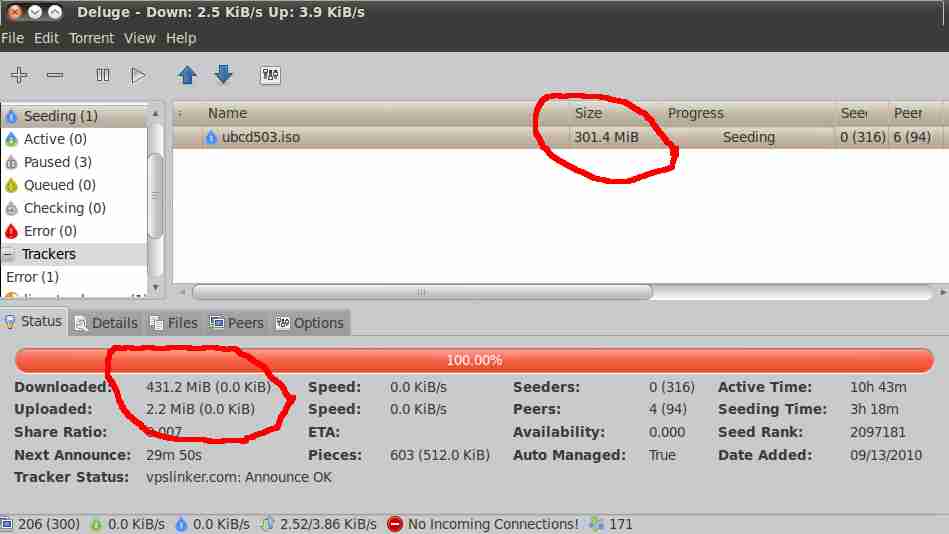
Look at the image above. I am downloaded "Ultimate Boot CD". I know that ISO file size is 301.4 MiB. But at the 'Stats' on bottom tab section it shows that file size is 432.2 MiB. What a huge difference.
 Yes, Deluge has many kind of feature that I did not understand. I read Deluge FAQ file sevaral times. But failed to understand many of them. Actually I have less knowledge about torrent file or society.
Here is a variation I noticed and do not understand what is going there.
Look at the image above. I am downloaded "Ultimate Boot CD". I know that ISO file size is 301.4 MiB. But at the 'Stats' on bottom tab section it shows that file size is 432.2 MiB. What a huge difference.
Visitors OS variation on my blog
2
Today I am quite curious about my visitors Operating System. You know I have add a tracker on my blog. I took that free visitors tracker from Sitemeter. When I am going checking to know about the operating system of my visitor blog. I got confused with two type of information.
Sitemeter said that most of my blog visitors using Linus.
But blogger.com blog's default (newly activated) Stats saying that my major visitors are using Windows operating system. Look at the images below: SiteMeter says that my blog visitors are mostly using Linux operating system. They are 46.2 % within all visitor.
 But Blogger.com default Stats telling me that my visitors are coming from mainly Windows operating system. They are 56 %. What a contradictory problem! I am not sure which is correct.
Sitemeter said that most of my blog visitors using Linus.
But blogger.com blog's default (newly activated) Stats saying that my major visitors are using Windows operating system. Look at the images below:
 SiteMeter says that my blog visitors are mostly using Linux operating system. They are 46.2 % within all visitor.
 But Blogger.com default Stats telling me that my visitors are coming from mainly Windows operating system. They are 56 %. What a contradictory problem! I am not sure which is correct.
What is my IP address?
1
Today I am trying to know my IP address. IP stands for "Internet Protocol". My internet service provider give me dynamic ip address everytime when I connect to internet. There is no option to get any static ip address. I know that it changes everytime I press connect button. I tried to know my current IP address. But failed. Yes. I am failed to know my correct IP address. I know you won't believe me. You will say that there are many many website who shows vosotprs ip address if I just visit them. So why don't I get any answer of this simple question.
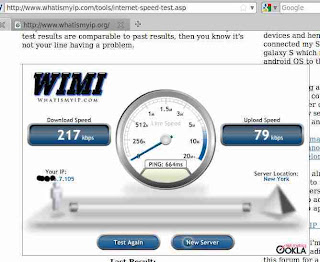 This is result of whatismyip.com
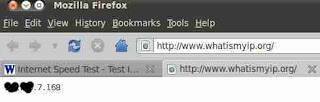 and this is result of whatismyip.org
Wait friend, I am explaining. Look at the two pictures I uploaded above. Both results say two type of answer. Those picture was taken tomorrow. I am giving you todays result below.
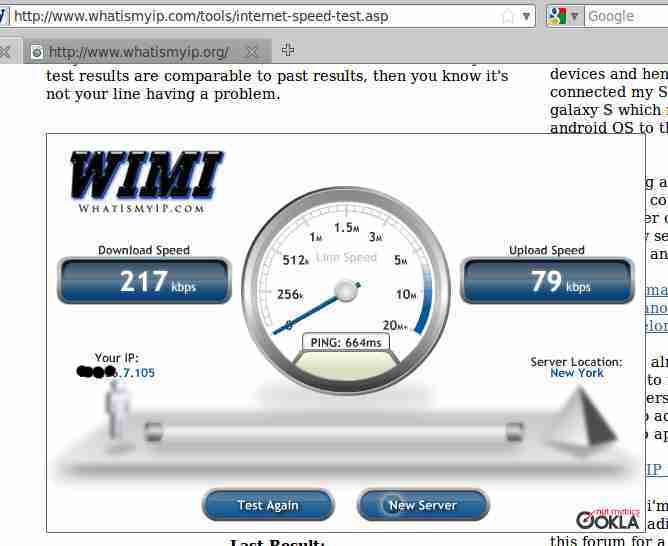 This is result of whatismyip.com
 and this is result of whatismyip.org
- First result from whatismyip.com. It says that my ip address is ***.**.7.115
- Second result from whatismyip.org. It says that my ip is ***.**.7.178
- Third result from whatismyipaddress.com. It shows that my ip address is ***.**.7.178
- Fourth result from ip-adress.com. It says that my IP Address is ***.**.7.17
- Fifth result from whatsmyip.org. It says that my ip address is ***.**.7.146
Page loading time script for blogger blog
3
Today I am giving a script which will tell about the loading time of any page of your blogger blog. If you search Google for this kind of 'page load timer script' to show your page loading time then you will get some html code. But none of them are made for Blogger.com blog. But with this script which I am publishing now you can get actual loading time of your blogger blog page.
You can use this javascript code to show how long a blogpost taking to load. A automatic timer will starts when a page begin to parse and timer will stop when that page has completed loading all content.
Here is the code and installing instruction.
Login in you blogger.com blog. Then copy and paste the code below after<head>
You can use this javascript code to show how long a blogpost taking to load. A automatic timer will starts when a page begin to parse and timer will stop when that page has completed loading all content.
Here is the code and installing instruction.
Login in you blogger.com blog. Then copy and paste the code below after<head>
<script type='text/javascript'>Now find and paste this code before </body>
var d = new Date();
var starttime = d.getTime(); //Get the start time
</script>
<script type='text/javascript'>At last get a html gadget in Design>Page Elements and paste this code into any Html/ Javascript widget-
var d2 = new Date();
var endtime = d2.getTime(); //Get the end time
//Find the difference between the start and end times
var totaltime = (endtime - starttime)/1000;
//Round 2 decimal places
var result = Math.round(totaltime*100)/100;
//Output results to a "P" element
document.getElementById("loadtime").innerHTML = "Page loading time: "+ result +" seconds";
</script>
<p id="loadtime">Loading....(You may write any custom message here)</p>I wish you won't get any problem to install the codes in your blogger.com blog. If you face any problem please comment here to inform me.
Best free zip-archive tool in the world
0
I just got a proof of this question: Which is the best zip tool.
If anybody search for the best archiver, compression utility or zip tool for Ubuntu linux or windows, he or she must be point to only one famous and most popular archiver in the world, the 7zip. You do not need to believe my word. Just search google or yahoo or bing or any other engine with any compression, zip, archiver type keyword and get the result. If you do not use any keyword like '7zip', '7z' in search field, though you will get the first result positioned only for 7-Zip. I know this information and use 7zip for some years both on windows and ubuntu. Today I got a proof of 7zip's great performance.
 Afghan War Diary 2004-2010' from Wikileaks. This giant archive is full of huge hidden documents. Afghan War Diary 2004-2010 folder contain 88,095 items, and weight totaling 3.5 GB.
Here is some mathematic:
Wikileaks sharing this file as 7z format. File size 75 MB. (http://leakmirror.wikileaks.org/file/straw-glass-and-bottle/afg-war-diary.html.7z) My 'downloader for x' showing the size is 78168057 byte. After extracting this file it took 3.5 GB space in your harddisk. I compress this folder as zip format. And found that this zip file weight 841.2 MB (882047410 bytes). What a difference between the compression rate of 7z and zip format. Whares 7z own only 75 MB but zip format take 841.2 MB. When I understand the differences between zip format compression and 7z format compression. I did not take seconds to make the decision that: Which is the best free compression tool in the world? My vote must go to 7zip software, a powerful compression utility.
If anybody search for the best archiver, compression utility or zip tool for Ubuntu linux or windows, he or she must be point to only one famous and most popular archiver in the world, the 7zip. You do not need to believe my word. Just search google or yahoo or bing or any other engine with any compression, zip, archiver type keyword and get the result. If you do not use any keyword like '7zip', '7z' in search field, though you will get the first result positioned only for 7-Zip. I know this information and use 7zip for some years both on windows and ubuntu. Today I got a proof of 7zip's great performance.
 Afghan War Diary 2004-2010' from Wikileaks. This giant archive is full of huge hidden documents. Afghan War Diary 2004-2010 folder contain 88,095 items, and weight totaling 3.5 GB.
Here is some mathematic:
Wikileaks sharing this file as 7z format. File size 75 MB. (http://leakmirror.wikileaks.org/file/straw-glass-and-bottle/afg-war-diary.html.7z) My 'downloader for x' showing the size is 78168057 byte. After extracting this file it took 3.5 GB space in your harddisk. I compress this folder as zip format. And found that this zip file weight 841.2 MB (882047410 bytes). What a difference between the compression rate of 7z and zip format. Whares 7z own only 75 MB but zip format take 841.2 MB.
 When I understand the differences between zip format compression and 7z format compression. I did not take seconds to make the decision that: Which is the best free compression tool in the world? My vote must go to 7zip software, a powerful compression utility.
My internet speed variation
0
 I am downloading 'Free Mega Game Pack for Linux' with 'Transmission Bittorrent client'. Suddenly I feel curious about my internet speed. So I look at 3 info source and found 3 type of result.
At first I look at 'Transmission'
It is telling that my My download speed is 16.3 KB/s
Then I look at my 'NetSpeed'. It showing that my internet speed is download:26.9 KiB/s
Now, I open the 'Device Details' on Net speed. It is said that my to download speed is 32.0 KiB/s.
I am confused about this speed variation. I don't know which is correct.
 I am downloading 'Free Mega Game Pack for Linux' with 'Transmission Bittorrent client'. Suddenly I feel curious about my internet speed. So I look at 3 info source and found 3 type of result.
At first I look at 'Transmission'
It is telling that my My download speed is 16.3 KB/s
Then I look at my 'NetSpeed'. It showing that my internet speed is download:26.9 KiB/s
Now, I open the 'Device Details' on Net speed. It is said that my to download speed is 32.0 KiB/s.
I am confused about this speed variation. I don't know which is correct.
My slow internet speed
2
Look at the image below. Lates Ubuntu updates are downloading with Update Manager. My Internet provider took a huge amount to connect online. But how much they return, here is a snapshot as a proof. A 27.3 MB files will take 26 minutes to download.  I am just curious to know about it that if it is average internet speed throughout the world or not?I wish you will share your experience with me. Thank you.
 I am just curious to know about it that if it is average internet speed throughout the world or not?I wish you will share your experience with me. Thank you.
Women in web design
1
Day by day women are coming out of home more and more. They are working in more field with their male collegue. There are some special problem created in our society which is effective only for female person. But overlooking the hazard many female came in the real world to fight against anti feminist theory. Web industry is not out of this little world. So there are many women who are working in this field.
I have just read a group interview in famous Smashing magazine. In that blog post there are some success story of some women web designer. They are answering some fixed questions
SM is not effiliated with this post. Their post "women in web design: group interview"


I have just read a group interview in famous Smashing magazine. In that blog post there are some success story of some women web designer. They are answering some fixed questions
- Who are your role models, and what styles influence your work the most?
- Is it difficult for female designers to find their place in the design community?
- How did you manage to get where you are now? What did you study, and how did you become interested in design?
- What are the most difficult challenges a designer faces in her career?
- What would you recommend to students who aspire to working in design?
- How does a student determine whether design is for them or they should pursue another career?
- How did you adapt your skills and knowledge to the challenges you faced?
- What are the most significant things you wish you had known when starting out designing websites?
- What is the most disappointing mistake or problem that you’ve encountered in your careeer?
- What should students and new designers focus on outside of their course work to advance in their careers?
- What job-search advice do you have for recent graduates?
- What should new freelancers do during the first few months of their business to succeed?
- What are some of the best ways for new designers to find clients?
- What are your personal organization or time-management tips for a professional designer’s workflow?
- How do you handle the pressure of deadlines and find time for your family?
- Rachel Andrew (edgeofmyseat.com | this is rachelandrew.co.uk | twitter)
- F. Claire Baxter (Vanity Claire | twitter)
- Jan Cavan (Dawghouse Design Studio | twitter)
- Adelle Charles (Fuel Brand Inc | Adelle Charles | twitter)
- Kristi Colvin (Fresh ID | kris colvin | twitter)
- Molly E. Holzschlag (Molly.com | Twitter)
- Eva-Lotta Lamm (Eva-Lotta Lamm | Twitter)
- Gisele Jaquenod (Gisele Jaquenod & Birdie | Twitter)
- Inayaili de León (Yaili | Web Designer Notebook | Twitter)
- milo317 (3oneseven | Twitter)
- Sarah Parmenter (You Know Who | the blog of Sarah Parmenter | Twitter)
- Elena Scanteie (Design Disease | Twitter)
- Grace Smith (Postscript5 | gracesmith.co.uk | Twitter)
- Amber Weinberg (amberweinberg.com | Twitter)
- Lynda Weinman (lynda.com | Twitter)
- Lisa Sabin-Wilson (E.Webscapes | Just a girl | Twitter)
SM is not effiliated with this post. Their post "women in web design: group interview"
Use Global Menu on Ubuntu 10.04
0
 Recently Mark Shuttleworth announce a new feature for Ubuntu 10.10 version. It will appear in only on netbook version. This feature won't be available on desktop version. Name of this new feature is "Global Menu".
Mark shuttleworth said on his blog:
Global Menu is a kind of Mac OS X like globally-shared menu bar. Which will use for applications launched in desktop session. This is currently only available for Gnome.
Though this 'Global menu' is only for netbooks and will release in Ubuntu 10.10 version, you can start to use it right now.
First add the repository in you system with this command in terminal
 Recently Mark Shuttleworth announce a new feature for Ubuntu 10.10 version. It will appear in only on netbook version. This feature won't be available on desktop version. Name of this new feature is "Global Menu".
Mark shuttleworth said on his blog:
We’re going to put the menu in the panel on the netbook edition of Ubuntu, and not on the desktop edition, because that’s where the screen real-estate is most precious. There are outstanding questions about the usability of a panel-hosted menu on much larger screens, where the window and the menu could be very far apart. Those questions are greatly diminished in the netbook environment, by definition.On this blogpost Mark explain everything about this 'Netbook Global Menu". He just want to make it clear that why this kind of menu is need on netbooks. Netbook computer has a very limited vertical size on screen. Standard is 1024×600. There is no problem about widh but vertical space is too short that developer need to think more. At last the confirm a solution. They add a 'Global Menu'.
Also, the netbook edition has a reduced application load. That will reduce the number of applications we need to get this working on.
However, it will be straightforward to use this on your desktop too, if you want, and we’d encourage people to try with that configuration. The more testing we have early on, the better we’ll understand how it works with different applications. It will be easy to add to the standard desktop panel for people who want to try it out, or prefer to work that way.
Global Menu is a kind of Mac OS X like globally-shared menu bar. Which will use for applications launched in desktop session. This is currently only available for Gnome.
Though this 'Global menu' is only for netbooks and will release in Ubuntu 10.10 version, you can start to use it right now.
First add the repository in you system with this command in terminal
sudo add-apt-repository ppa:globalmenu-team/ppaThan apply the command below for Karmic and Lucid
sudo apt-get update && sudo apt-get install gnome-globalmenuRemember that this Global Menu is not that which Mark shuttlworth said in his blogpost. This application already running and developing by Ubuntu community. It's name is Gnome2 Global Manu. It has some limitation.
- It will not work in Firefox and Open Office
- It will not display window title and controls.
How to Install Newer onto Older
0
Ubuntu 10.04 LTS final release is going to publish tomorrow. I know you all Linux/ Ubuntu lovers are waiting for that special moment. After announcement every open source and ubuntu enthusiast will download the newer version and install in their system. I will do same, but thinking the correct method. My asking to myself is 'how do I install newer ubuntu?' I am using Ubuntu 9.10 now. My home folder is full of valuable data. I don't want to lose them all. I know partitioning in Linux. But as a new user I don't know how to install newer Ubuntu 10.04 onto older Ubuntu 9.10? I know that their is a fine solution on this topic. But for last days I cannot remember that way. Some minutes ago I found the way that I can erase older ubuntu but my home folder will be safe.
The solution: At a partitioning stage, I will select 'manual partition' then select root to my older root, swap to older swap and home to the older home folder. I will select 'format' for 'root' and 'swap' partion, not in 'home' partition.
Then newer ubuntu will delete all the information of older ubuntu but 'home' folder will stay intact and safe. On install process installer will not touch 'home' partition because I did not give permission to delete files from it. I just say installer to use it as a home folder. I think I am right. Do you have any suggestion?
The solution: At a partitioning stage, I will select 'manual partition' then select root to my older root, swap to older swap and home to the older home folder. I will select 'format' for 'root' and 'swap' partion, not in 'home' partition.
Then newer ubuntu will delete all the information of older ubuntu but 'home' folder will stay intact and safe. On install process installer will not touch 'home' partition because I did not give permission to delete files from it. I just say installer to use it as a home folder. I think I am right. Do you have any suggestion?
I have changed my contact form
0
 After starting this blog, I have add a contact form in this page. I used 'Wufoo" to create a contact form. But today I have changed my provider.
Last day one of my friend said that he just send a mail to me and I did not answer her yet. She is very angry to me for my not reply. I am astonised. What is she said? I thought did she really send me any mail using my blog's contact form? I checked that form by myself sending a fake email. But alas! She is write and I am wrong. 'Wufoo' did not send me any mail. That means 'wufoo' contact form is not working? Why? What's the reason? Is it for that I am a free user? If so, then they did not done any fare job to me. Because I did not found any such kind information that they will not send mail to me if I am a free user.
I log on to 'wufoo' site and did not found any mail if they want free users to log in to read mails. No. There was no any mail waiting for me. Even there is no any options or help page which describe my problem.
So, I decided to through out 'wufoo' from my site. Actually 'wufoo' has many nice feature and colorful control panel. I liked them all. And want to write a post about them. But they done unfair to me. They don't like free users. They don't want free blogger to use their form. They should write it clearly in bold text in their website. Even they have not any trial period for their free users.
Today, I go to http://www.emailmeform.com site and made a Email Me form for my blog. I add it into my blogs Contact Page and working nice. You may check it sending me a mail.
I am very happy with the service of 'emailmeform'. I will write a post about them as soon as possible.
 After starting this blog, I have add a contact form in this page. I used 'Wufoo" to create a contact form. But today I have changed my provider.
Last day one of my friend said that he just send a mail to me and I did not answer her yet. She is very angry to me for my not reply. I am astonised. What is she said? I thought did she really send me any mail using my blog's contact form? I checked that form by myself sending a fake email. But alas! She is write and I am wrong. 'Wufoo' did not send me any mail. That means 'wufoo' contact form is not working? Why? What's the reason? Is it for that I am a free user? If so, then they did not done any fare job to me. Because I did not found any such kind information that they will not send mail to me if I am a free user.
I log on to 'wufoo' site and did not found any mail if they want free users to log in to read mails. No. There was no any mail waiting for me. Even there is no any options or help page which describe my problem.
So, I decided to through out 'wufoo' from my site. Actually 'wufoo' has many nice feature and colorful control panel. I liked them all. And want to write a post about them. But they done unfair to me. They don't like free users. They don't want free blogger to use their form. They should write it clearly in bold text in their website. Even they have not any trial period for their free users.
Today, I go to http://www.emailmeform.com site and made a Email Me form for my blog. I add it into my blogs Contact Page and working nice. You may check it sending me a mail.
I am very happy with the service of 'emailmeform'. I will write a post about them as soon as possible.
Nested Labels are enabled at Gmail
0
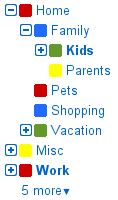 Gmail blog has published and announcement. The said that nested label feature is now enebled in Gmail. Here is a snapshot at the left side. How to get it in Gmail inbox? If you like to use it, go to the Gmail Labs tab under Settings, and look for "Nested Labels". Now enable it and click "Save."
Now it is time to create some label. Name label with slashes (/) to make it the child of another. As example, let's say you wanted to create a simple hierarchy with a "Home" label, and inside it a "Members" and a "Jobs" label. Just create three labels with the following names:
Home
Home/Members
Home/Jobs
If you want, you can then create "Home/Members/Kids," "Home/Pets," etc.
In Gmail blog official said that :
 Gmail blog has published and announcement. The said that nested label feature is now enebled in Gmail. Here is a snapshot at the left side. How to get it in Gmail inbox? If you like to use it, go to the Gmail Labs tab under Settings, and look for "Nested Labels". Now enable it and click "Save."
Now it is time to create some label. Name label with slashes (/) to make it the child of another. As example, let's say you wanted to create a simple hierarchy with a "Home" label, and inside it a "Members" and a "Jobs" label. Just create three labels with the following names:
Home
Home/Members
Home/Jobs
If you want, you can then create "Home/Members/Kids," "Home/Pets," etc.
In Gmail blog official said that :
You can create complex hierarchies of labels if that's the way you like to organize your mail, and you can expand/collapse labels to save space. You'll always be able to tell whether a given label contains unread messages in its collapsed child labels by looking at whether it's bold or not.Read more tweaking at Gmail blog.
I redesign my blog with designer
0
I have just changed my blog's theme. I use a customise theme provide by third party. Today I applied new blogger theme which is made available by Blogger itself.
 This is my older template.
 This is my newer template.
I do it by using Blogger's new 'Template Designer' tools. Just login at www.draft.blogger.com and found a new link button at 'Layout' tab. Click on it and entered in a imaging area. I have just discover it, what a technology they have done for blogger's pleasure. Thank you Blogger team. I follow the methods to do the changes written below.
 This is my older template.
 This is my newer template.
I do it by using Blogger's new 'Template Designer' tools. Just login at www.draft.blogger.com and found a new link button at 'Layout' tab. Click on it and entered in a imaging area. I have just discover it, what a technology they have done for blogger's pleasure. Thank you Blogger team. I follow the methods to do the changes written below.


Subscribe to:
Posts (Atom)