Showing posts with label Xfce. Show all posts

Creating A New Panel in Linux Mint XFCE

2
Panel is my another favorite item in Linux desktop. I got addict using more then one panel in my system desktop. I always love to recommend it to my friends. You can add more then one Panel filled with various launcher (aka Application Link/ Shortcut). Today we will learn "How to add a new panel in xfce DE"? I am using Linux Mint 13 xfce to describe this.

Start Panel Properties from Main Menu> Settings > Panel
start panel properties main menu settings panel
Main menu > settings > Panel
You have option to start Panel properties right clicking on an empty place of bottom panel.
Read More »

Window Transparency in Linux Mint xfce

1
window transparency linux mint xfce
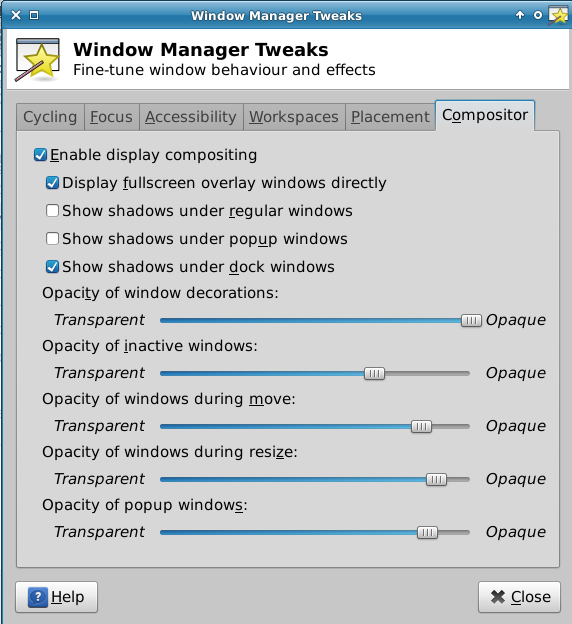
If you like to enable transparent effect in Linux Mint xfce while a window is moving or inactive then this post only for you. Enabling transparent feature in xfce is very easy. If your Computer RAM is sufficient to do so, then you could use this great eye catching feature in any xfce based linux distribution.

Use the Main Menu to heed to 'Window Manager Tweaks' through 'Settings'.
compositor for transparency in window manager tweaks tool linux mint xfce
Compositor tab in Window Manager Tweaks
After opening 'Window Manager Tweaks' directly go to the last tab named "Compositor". Now click on the radio button just beside the 'Enable display compositing'.

Now you could change value of various eye candy feature in this section.
  • Opacity of window decorations
  • Opacity of inactive windows
  • Opacity of window during move
  • Opacity of window during resize
  • Opacity of popup windows
Lets change the value moving the slider horizontally and enjoy.
Read More »

Change windows button position right to left in Linux Mint13 xfce

3
Changing position (Layout) of windows button from right side to left side is a really smarter feature like Mac OS. I like this cool style when I first found it in Ubuntu 10.04. Until then I always love to use it.

Today I am going to change windows button position from right side to left side in LinuxMint 13 xfce OS. Usually LinuxMint is a no problem operating system. Many feature make it easy to use and customize. So we could do our job with a customizing tool called 'Window Manager'.

Start 'Window Manager' from Main Menu> Settings.
window manager linux mint xfce main menu
Window manager in linux mint xfce main menu

'Window Manager' will open.
window manager linux mint xfce main menu
Linux mint xfce window manager
The first tab name is 'Style'. You could change 'Title Font', Title Alignment' and 'Button Layout' using this 'Style' tab. Explore other tabs to configure other thing in your Linux Mint window behavior and look.

How to change position? It's easy friend. Just drag the 'close', 'maximize' and 'minimize' button from right side to left side.
drag button position from right to left in window manager linux mint xfce
Drag button position from right to left in window manager linux mint xfce
You could drag and add 'Menu', 'Stick' and 'Shade' button shown on the image below.
add close, maximize, minimize 'Menu', 'Stick' and 'Shade' button in window linux mint xfce
add various button in linux mint xfce window title
Changing position of window button from right side to left side is quite tricky in Lubuntu (LXDE). If you like to explore the way please click the link below:
Read More »

Dictzip dependency problem in LinuxMint13xfce

0
A handy Dictionary is added in Linuxmint13xfce by default. I have tried to install local dictionary files with some offline deb files. I collect them from another computer where dictzip is installed via Synaptic package manager. That was an LinuxMint13 Mate machine. I collect all deb files from "/var/cache/apt/archives" folder. I use the famous installation command: sudo dpkg -i *

But, suddenly something goes wrong. Dictionary file installation has crashed. I think it is a version issue. So, I would like to do the same process from beginning. I know, now I have to fix the broken package. I open 'Synaptic package manager'. It shows a message, which says:
You have 2 broken packages on your system! Use the "Broken" filter to locate them.
Two broken package linuxmint13 xfce

The broken packages are shown below.
Dictzip wordnet-gui dependency problem in LinuxMint13xfce
I tried to fix the problem taking the help of this post 'Software index is broken', but nothing solved. The messages shown in terminal look like the text below.
dpkg: dependency problems prevent configuration of dictzip:
 dictzip depends on libmaa2 (>= 1.2.0); however:
  Package libmaa2 is not installed.
dpkg: error processing dictzip (--configure):
 dependency problems - leaving unconfigured
No apport report written because the error message indicates its a followup error from a previous failure.
                          dpkg: dependency problems prevent configuration of wordnet-gui:
 wordnet-gui depends on wordnet (= 1:3.0-22); however:
  Version of wordnet on system is 1:3.0-26.1.
dpkg: error processing wordnet-gui (--configure):
 dependency problems - leaving unconfigured
No apport report written because the error message indicates its a followup error from a previous failure.
                          Errors were encountered while processing:
 dictzip
 wordnet-gui
W: Waited for dpkg --assert-multi-arch but it wasn't there - dpkgGo (10: No child processes)
E: Sub-process /usr/bin/dpkg returned an error code (1)
A package failed to install.  Trying to recover:
dpkg: dependency problems prevent configuration of dictzip:
 dictzip depends on libmaa2 (>= 1.2.0); however:
  Package libmaa2 is not installed.
dpkg: error processing dictzip (--configure):
 dependency problems - leaving unconfigured
dpkg: dependency problems prevent configuration of wordnet-gui:
 wordnet-gui depends on wordnet (= 1:3.0-22); however:
  Version of wordnet on system is 1:3.0-26.1.
dpkg: error processing wordnet-gui (--configure):
 dependency problems - leaving unconfigured
Errors were encountered while processing:
 dictzip
 wordnet-gui
I am really sorry to say that I can not figure out the problem.
Read More »

Plugin "Xfce4 Timer" unexpectedly left the panel, do you want to restart it?

3
xfce4-timer-add-new-items-plugins-panel-properties
xfce4 timer plugin in panel properties
I have installed LinuxMint 13 xfce in my friends pc some days ago. I also Install Xfce4 Goodies in this pc. But alas! My bad luck. None of any plugin works perfectly after installation. Look at the image below.
Plugin Xfce4 Timer, Network Monitor, System Load Monitor, Verve Command Line, SmartBookmark, Quicklauncher, Sensor plugin, Mount devices, Mail Watcher, Generic Monitor, Disk Performance Monitor, CPU Graph, CPU Frequency Monitor unexpectedly left the panel
It said:
Plugin "Xfce4 Timer" unexpectedly left the panel, do you want to restart it?

The plugin restarted more than once in the last 60 seconds. If you press Execute the panel will try to restart the plugin otherwise it will be permanently removed from the panel

It has only two options: 1. Execute and 2. Remove

I clicked 'Execute' several times, but same message apear every time. I did not start the plugin once more in last 60 seconds. Though same message displaying its ugly face again and again. At last I have to click on 'Remove'. I found that other plugins such 'Network Monitor', 'System Load Monitor', 'Verve Command Line', 'SmartBookmark', 'Quicklauncher', 'Sensor plugin', 'Mount devices', 'Mail Watcher', 'Generic Monitor', 'Disk Performance Monitor', 'CPU Graph', 'CPU Frequency Monitor' etc are behave in same way. None of them start normally. Each of them 'unexpectedly left the panel'.

In this moment I can not understand the problem, so I can not fix it. Sorry, for this sentence.
Read More »

Install Xfce4 goodies in LinuxMint13xfce via synaptic

0
Recently I have installed LinuxMint13xfce in my friends pc. I choose LinuxMint13xfce for his older machine. If installed successfully and everything is working fine without any further download. Mp3, mpeg and other media files are playing without any update or download. I and my friend both are really happy with LinuxMint13xfce. Now I am going to install "Xfce4-goodies" for some extra plugins. I like to place them in the upper panel. Oh, yes there is no any top panel by default. I have created it just minutes ago.
xfce4-goodies in synaptic package manager of LinuxMint13xfce
Xfce4 goodies in LinuxMint13xfce
 Xfce4 Goodies is a bundle of various plugin whice are very helpfull for daily life. Here is the texts copied from synaptic package manager. It is an enhancements for the Xfce4 Desktop Environment.
Read More »

Install Xfce4 goodies in LinuxMint13xfce via synaptic

0
Recently I have installed LinuxMint13xfce in my friends pc. I choose LinuxMint13xfce for his older machine. If installed successfully and everything is working fine without any further download. Mp3, mpeg and other media files are playing without any update or download. I and my friend both are really happy with LinuxMint13xfce. Now I am going to install "Xfce4-goodies" for some extra plugins. I like to place them in the upper panel. Oh, yes there is no any top panel by default. I have created it just minutes ago.
xfce4-goodies in synaptic package manager of LinuxMint13xfce
Xfce4 goodies in LinuxMint13xfce
 Xfce4 Goodies is a bundle of various plugin whice are very helpfull for daily life. Here is the texts copied from synaptic package manager. It is an enhancements for the Xfce4 Desktop Environment.
Read More »

Two Lubuntu and Xubuntu blog to explore

2
Today I am going to tell you something about two blogspot blogs. Day by day LXDE and XFCE based distributions are coming infront of main stream Linux world. Many of us starting to love these lightweight operating systems. But there are not much blog which published tips and tricks about these desktop environments. Recently I found two blogspot blogs which are not official but publishing many valuable, informative, importent tips and tricks about LXDE and XFCE.
http://lubuntutips.blogspot.com Lubuntu blog
Lubuntu Tips
First of all I am telling about LXDE based Lubuntu blog. It's called "Lubuntu Tips". Url is http://lubuntutips.blogspot.com.

I don't know the man behind this blog. But I honor her/his effort to teach us about Lubuntu and LXDE. I learned many tips from this blog. I will publish some of them in my blog from "Lubuntutips" blog. Tips, tricks, hacks, customisation, decoration, various information and news about Lubuntu and lxde are available there. I really love this blogsite and visit it regularly. I am really learning miscelanious information from there.

My another favourite blog is http://xubuntugeek.blogspot.com/
http://xubuntugeek.blogspot.com Xubuntu blog
Xubuntu Geek
XFCE is another famous lightweight Desktop Environment in the Linux world. In the 'Xubuntugeek' blogsite, the briliant blog owner publish various informative, critical tips, information, news, tweek regularly. Once upon a time there is a 'Xubuntu' blog on wordpress. But now a days update posts did not come for many months. But this 'Blogspot' based blogsite is active now. I got many many idea, informations from this blog.

If you are a user of Lubuntu or Xubuntu, then these sites must help you much better then any other blog. I wish these blogs will continue their journey for many years and help people to solve various problem. I will publish some tips, tweek, hacks and informations from these blogsite with acknoledgement in the next days.

LubuntuTips address: http://lubuntutips.blogspot.com/
XubuntuGeek address: http://xubuntugeek.blogspot.com/

Read More »

Download Kubuntu, Edubuntu, Lubuntu and Xubuntu 12.04

5
You may know that Ubuntu 12.04 LTS (Precise Pangolin) Published to download. But there are more Ubuntu derivatives which you can taste. They are Kubuntu, Edubuntu, Lubuntu and Xubuntu. All distributions are now have 12.04 version. All are LTS (Long term support). From this version ubuntu and its all derivatives will get security and other support for 5 years. I think this distributions might be helpful for you if you want some different essence according to your choice, working habit and hardware support. Here I am explaining one by one.
Read More »