Showing posts with label WebTool. Show all posts

No upload methods available on Google drive

8
Online cloud service Google drive for pc smart mobile phone
Google drive
 I am very happy to say you that my Google Drive space has been activated just minutes ago. I got an email at my inbox. It says:-
Congratulations!

You can start using Google Drive for your account: **********@gmail.com

With Google Drive, you can:

    Access your most up-to-date files from any device or browser
    Share and collaborate on files with exactly who you want, wherever you are
    Safely store all your files in one place

On behalf of files everywhere,
The Google Drive Team
I feel proud to get this access and run to start using this amazing service by Google. But alas!!
no-upload-method-available-now-google-drive

The sad thing is, I found that I can not upload anything on my Google Drive. I created a new folder to store uploaded files. I click on the 'HardDisk' icon just behind the red button 'Create'. But, It says:-
No upload methods available. Please check your system configuration.
I use Ubuntu Linux. I know that Google drive is not ready for Linux yet. I think this is the cause of this kind of message.
Read More »

Active Energy Saving Mode on Blogger blog

2
Active Energy Saving Mode or screen saver on Blogger blogEvery minute visitors browsing websites emit 1.2kg of CO2 into our atmosphere. We conscious people should not do this intentionally. So, conscious webmaster like to add a script on their blog which reduce some CO2 activating an energy saving mode on their blog. 'OnlineLeaf.com' site set a campaign for Green Website. They create a standby engine which make a website greener then other. After adding a code snippet on your blog you can will convert in a less CO2 emitting website. It is very easy to implement. You do not need to know and environmental science to make your site environment friendly. Read more at www.onlineleaf.com.

Today we will learn how to make our blogger/ blogspot hosted blog a environment friendly website. Our blog will reduce CO2 on environment and will neutralize our CO2 footprints. This will work actively for 24 hours and will count every second. Do not doubt it activeness. It is a famous web tool to make this world more greener with the help of online.

What they say on their site:
The standby engine is a project developed to reduce power consumption, when generating and displaying a website, without changing user experience while using the website. This is done by covering the site in a stationary, black color, which hides visual effects making the visitor's computer use less energy generating and displaying these.
It might not seem like a lot of difference, but after all every little bit does count.
Ok, lets start....
Read More »

I have enable mobile view of my blogger blog

0
I just enable mobile view of my blogger blog 'netgator.blogspot.com'. You also can enable this on your blogspot blog easily. Look at the image right side of this post. This is my 'NetGator' blog's snapshot but quite different in view and arrangement. Yes, this is called mobile view. If you have a smarter mobile phone (modern mobile device powered by latest mobile operating system) then you can see my blog in this style. You can view it when you have no desktop pc/ laptop/ netbook in your hand. Say, you are visiting country side by bus or foot or hiking a mountain. In this kind of abnormal place (where you can not use desktop/ laptop/ netbook) a smartphone can feed your blogsite reading hungry.

Do you have a blogger/ blogspot blog? Want to enable mobile view on your blog?
  • Log In to http://draft.blogger.com site.
  • On Dashboard, directly go to Settings.
  • Now click on 'Email & Mobile'
  • Click to mark the radio button next to the sentence "Yes, On mobile devices, show the mobile version of my template."
  • Click on 'Mobile Preview' blue text button to see a preview.
  • Click 'Save Settings' at the bottom of this page.
  • You have done.
  • Remember that, it is a beta effort. So blogger do not give any guarantee to work it perfectly.
By the way I have not any smartphone. So I can not check the actual view of my blog. I publish the screenshot taken from 'Mobile Preview' option.
Read More »

Print-PDF button on blogspot blog post

0
Print save as pdf button on every blogspot blog postSometimes we want to add a 'Print' button on every blog post. But there is no option on blogger.com blog dashboard. You can not able to add any 'Print' or 'Save as PDF' button on every blogger blog posts, via its own controlling system. You may add a 3rd party tool to do this job perfectly. Today I am publishing same kind of webtool for your blogger, wordpress blog or for your static website. Now, you can add a print button / offer your readers to print every blog post or save them as pdf. I think if you write well and your reader want to read your ideas later then printing a web page or save them as pdf will serve properly at offline.

A newly published online service will do this job for you with a smart way. You can peak your desired one from a range of design or add a simple text link to print every blogspot blog post.
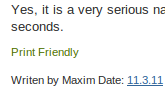
printer friendly textlink blogspot post
You can offer your readers to do print related various job with more functional way with this great feature rich webtool. Your readers can print an optimized version of that specific blog post.

What it can do?
  1. It can Print.
  2. It can print / save as PDF.
  3. It can send that page as email.
  4. You can change text size.
  5. You can remove picture to reduce inkcharge.
  6. You can delete any specific paragraph clicking once.
  7. and Undo everything which you done wrong.
  8. What's more....
How to add it on blogger blog?
Just follow the instructions one after another.
  1. Login on your Google account.
  2. Go to blogger's dashboard.
  3. Go directly to Design > Edit HTML
  4. Search for <div class='post-footer'>
  5. Just after this texts, paste the supplied codes
  6. Save template.
You can get this 'Printer Freindly' button code from 'Printer Friendly.com' site. (Click the sitename and visit that site to grab the HTML code)
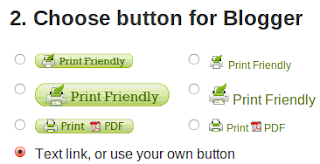
choose a button design from various many printerfriendly buttonYou can choose from several design or just get a text link based print button like the snapshot/ screen-shot above (green colour). You can choose from 6 design or use your own customize text or image file, instead of supplied print button image. You can add your own text later.

If you feel happy getting this webtool or get worried for any problem, please don't forget to leave a simple line to let me know it.
Read More »

Newton's third law on your blog

0
add Newton's third law flash gadget on blogger blogspot blog sidebarNewton's third law flash gadget preview

Add a gadget in your blog's sidebar, which represent newton's third law. If you love physics, like to share science with others, then this fantastic gadget might satisfy you. Put the codes below in any Html/ Javascript gadget and save the changes.
<object type="application/x-shockwave-flash" style="outline:none;" data="http://hosting.gmodules.com/ig/gadgets/file/112581010116074801021/newtonsCradle.swf?up_numBalls=6&up_speakerColor=999999&up_barColor=A9AAB0&up_stringColor=ECF078&up_bgColor=1D2C8F&up_ballColor=FCA9CD&" width="300" height="225"><param name="movie" value="http://hosting.gmodules.com/ig/gadgets/file/112581010116074801021/newtonsCradle.swf?up_numBalls=6&up_speakerColor=999999&up_barColor=A9AAB0&up_stringColor=ECF078&up_bgColor=1D2C8F&up_ballColor=FCA9CD&" /><param name="AllowScriptAccess" value="always" /><param name="wmode" value="opaque" /></object>
I will be very happy if you found this simple gadget as a educational tool for your child.

Oh! what Newton said on his third law?
For every action there is an equal and opposite reaction.
More explanation can be found on Wikipedia
Read More »

Gmail has no text area to write mail

0
Gmail has no text area to write mailJust discovered that Gmail has no any text area to write email. Is it caused by slow internet connection? Is it Gmail's server or any technical error? I am still searching internet to find some solution or at least any suggestion.
Read More »

Twitter blog using blogger blog

0
Twitter blog using blogger blogI have just visit blog.twitter.com and found that it is using blogger.com hosting blog. I am gettng surprise to see that they have not put any link to blogger.com. I guess if they use wordpress blog then they must use a phrase 'Proudly powered by wordpress'.

My question is why twitter authority have not mention any acknowledgement to blogger. They should write a single line like me. I wrote a single line at the bottom of my blog "Powered by Blogger." This is a common courtesy to using any free service online, but twitter failed to show it.
Read More »

Best File Share or Hosting Site Online

2
Best File Share/ Hosting site Box.netWhich is the best file sharing or hosting site on internet? Which site do you use usually to store your valuable important files online? What type of service do you want when you trying to share a file online with your friends?

You may think these questions yourself or ask someone several times. But you did not get correct answer yet? Am I right? If your answer is 'yes' then please give me some seconds to explain myself. I am also curious to know it. I also need it. I am not an online geek, so I don't need much. I use only Box.net. I enjoyed it's feature. The best thing of box.net is, it does not allow any illegal item to upload. But there are many better file hosting services are waiting to help us. I like to know their name and weblink. I searched Google and found some name to share. I did not visit all of them but I wish to do it in near future. In this post I am just writing some name of the best file sharing or file hosting site found on internet. Store your file online and share them with us using the hosting services below.
  1. Box.net
  2. Google Sites
  3. Google Docs
  4. FileDropper
  5. WikiSend
  6. Streamfile
  7. Dropbox
  8. Badongo
  9. DivShare
  10. Drop.io
  11. Windows Live SkyDrive
  12. 4Shared
  13. Mediafire
I wish, this list might help you to find a online file sharing solution. But you may ask which is the best webtool for general user?
Read More »

CrypTool for Cryptography and Cryptanalysis

0
CrypTool for Cryptography and CryptanalysisWant to learn Cryptography and Cryptanalysis? Then 'CrypTool' is a solution for you. It is a free, open-source e-learning application, used worldwide in the implementation and analysis of cryptographic algorithms. It can supports both contemporary teaching methods at schools and universities as well as awareness training for employees and civil servants.

Latest release include these features:
  • Numerous classic and modern cryptographic algorithms (encryption and decryption, key generation, secure passwords, authentication, secure protocols, etc.)
  • Visualization of several algorithms (Caesar, Enigma, RSA, Diffie-Hellman, digital signatures, AES, etc.)
  • Cryptanalysis of several algorithms (Vigenère, RSA, AES, etc.)
  • Cryptanalytical measurement methods (entropy, n-grams, autocorrelation, etc.)
  • Related auxiliary methods (primality tests, factorization, base64 encoding, etc.)
  • Number theory tutorial
  • Comprehensive online help
  • Accompanying script with additional information about cryptology
  • And more!
Sorry to say that this application is not available for Linux. It is only for Windows. Visit Official site for details.
Read More »

Tor: defend network threatens

0
As the official website says Tor defend against a form of network surveillance that threatens personal freedom and privacy. If your activities look confidential business and need to keep security, want to analys traffic then Tor is perfect tool for you.
Tor internet securityMany kind or internet users use Tor to protect their privacy. Tor can help you stay safe online.
Tor protects you by bouncing your communications around a distributed network of relays run by volunteers all around the world: it prevents somebody watching your Internet connection from learning what sites you visit, and it prevents the sites you visit from learning your physical location. Tor works with many of your existing applications, including web browsers, instant messaging clients, remote login, and other applications based on the TCP protocol.
This valuable software is also available in Linux too. Also available for Mac and Windows.

But Tor is not a magical thing, which protect you automatically. If you just install it and do nothing then Tor can not do anything. You need to configure some information to work it properly. There is a read first section in download page. That means you should read it before download Tor.

Warning: Want Tor to really work?

...then please don't just install it and go on. You need to change some of your habits, and reconfigure your software! Tor by itself is NOT all you need to maintain your anonymity. There are several major pitfalls to watch out for:

  1. Tor only protects Internet applications that are configured to send their traffic through Tor — it doesn't magically anonymize all your traffic just because you install it. We recommend you use Firefox with the Torbutton extension.
  2. Torbutton blocks browser plugins such as Java, Flash, ActiveX, RealPlayer, Quicktime, Adobe's PDF plugin, and others: they can be manipulated into revealing your IP address. For example, that means Youtube is disabled. If you really need your Youtube, you can reconfigure Torbutton to allow it; but be aware that you're opening yourself up to potential attack. Also, extensions like Google toolbar look up more information about the websites you type in: they may bypass Tor and/or broadcast sensitive information. Some people prefer using two browsers (one for Tor, one for unsafe browsing).
  3. Beware of cookies: if you ever browse without Tor and a site gives you a cookie, that cookie could identify you even when you start using Tor again. Torbutton tries to handle your cookies safely. CookieCuller can help protect any cookies you do not want to lose.
  4. Tor anonymizes the origin of your traffic, and it encrypts everything between you and the Tor network and everything inside the Tor network, but it can't encrypt your traffic between the Tor network and its final destination. If you are communicating sensitive information, you should use as much care as you would on the normal scary Internet — use HTTPS or other end-to-end encryption and authentication.
  5. While Tor blocks attackers on your local network from discovering or influencing your destination, it opens new risks: malicious or misconfigured Tor exit nodes can send you the wrong page, or even send you embedded Java applets disguised as domains you trust. Be careful opening documents or applications you download through Tor, unless you've verified their integrity.
There are many people and company around world use Tor to protect themself. International Broadcasting Bureau (http://www.ibb.gov/), Reporters without borders (http://www.rsf.org/) using it. Militaries, Journalists, Business person, Bloggers, Law enforce officers use Tor. Read 'Who Use Tor' page for details.

To download Tor visit this Download page.
For various kind of Linux installer please visit Download Unix
Read More »

3 tab gadget for blogger blog

0
I am publishing a new kind of gadget today. This is called 3 tab gadget. There are many kind of tab based gadget box you can use in your blogger blog. But I think this tabbed gadget box is the easiest one. Look at the image below:3 tab gadget blogger blogAfter install it will look like it. Sharp, smart looking, fast loading. No need to do anything in html area. So there is no any chance to do any harm to blog template.

Download the source file from this link. Extract this zipped archive. You will get a text file named: ng-3tabbed-widget.txt

Open this text file with a text editor. Copy all codes with 'Select all' command. Paste all codes in a Html/ Javascript Gadget box at Design>Page Eliments after logging in blogger.com account.

Save that gadget. Don't name it. Drag the gadget in a suitable place in your sidebar. Save chances.

Features:
  • 3 tabs, can be use more tab for more gadget.
  • Tab width : 340px and height: 200 px. You can change these values according to your sidebar size and needs.
  • Changeable color, border, border and tab color.
  • You can change 'New Posts' or 'Comments' changing the perfect code.
You anything goes wrong, please comment or email me. I will try to solve your problem. Thanks


Download the source file by clicking here.
File type zip (compressed file0.
File size: 1 KB
Read More »

Ubuntu 10.10 countdown button

0
Now, Ubuntu 10.10 (Maverick Meerkat) countdown button has published officially. All new countdown button are available at this page. You can add them on your blog or website. There are only 25 days left for Ubuntu 10.10 (Maverick Meerkat). Be informed at the right time when new release published for download.
Ubuntu Linux countdown button for website and blog
<a href="http://www.ubuntu.com/"><img src="http://www.ubuntu.com/countdown/banner1.png" border="0" width="180" height="150" alt="The next version of Ubuntu is coming soon"></a>
<a href="http://www.ubuntu.com/"><img src="http://www.ubuntu.com/countdown/banner2.png" border="0" width="180" height="150" alt="The next version of Ubuntu is coming soon"></a>
ubuntu linux countdown button
<a href="http://www.ubuntu.com/"><img src="http://www.ubuntu.com/countdown/banner3.png" border="0" width="180" height="150" alt="The next version of Ubuntu is coming soon"></a>
ubuntu countdown banner
<a href="http://www.ubuntu.com/"><img src="http://www.ubuntu.com/countdown/banner4.png" border="0" width="180" height="150" alt="The next version of Ubuntu is coming soon"></a>
Add the codes on your blogger's blog html/javascript gadget box. You can grab many unofficial countdown banner for your blog from this page.
Read More »

What is my IP address?

1
Today I am trying to know my IP address. IP stands for "Internet Protocol". My internet service provider give me dynamic ip address everytime when I connect to internet. There is no option to get any static ip address. I know that it changes everytime I press connect button. I tried to know my current IP address. But failed. Yes. I am failed to know my correct IP address. I know you won't believe me. You will say that there are many many website who shows vosotprs ip address if I just visit them. So why don't I get any answer of this simple question.

what is my ip internet protocol address.comThis is result of whatismyip.com

what is my ip address .organd this is result of whatismyip.org

Wait friend, I am explaining. Look at the two pictures I uploaded above. Both results say two type of answer. Those picture was taken tomorrow. I am giving you todays result below.
  • First result from whatismyip.com. It says that my ip address is ***.**.7.115
  • Second result from whatismyip.org. It says that my ip is ***.**.7.178
  • Third result from whatismyipaddress.com. It shows that my ip address is ***.**.7.178
  • Fourth result from ip-adress.com. It says that my IP Address is ***.**.7.17
  • Fifth result from whatsmyip.org. It says that my ip address is ***.**.7.146
Besides five results, only two of them shows same result. Other three webtool shows different result from each other. I am confused. What is my real ip address in this moment? I don't know, how can I know that?
Read More »